Virtual try-on for eyewear in 2026: what has changed and what to ask a provider
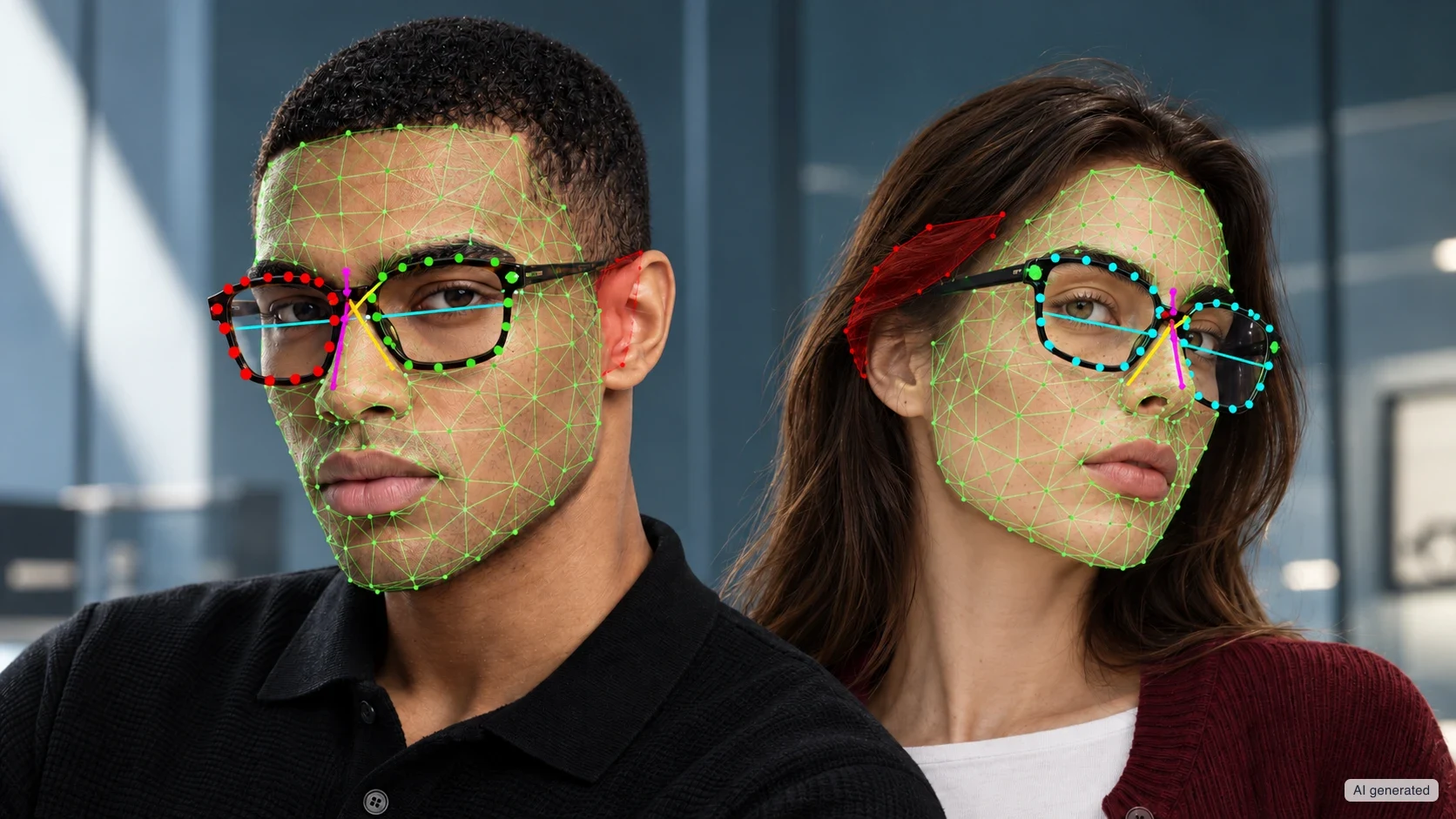
Virtual try-on (VTO) helps a customer understand how a frame looks on their own face. For a brand or a retailer, choosing a provider calls for a broader check: sizing, lenses, ease of use, data processing and integration with the catalogue.
In 2026, a useful evaluation starts with these questions. Does the digital model match the glasses actually sold? Does the try-on stay stable when the user moves? Are the estimated measurements backed by documented validation? Does the flow work on the devices your customers use?
This guide brings together the criteria to take to a demo. The aim is to choose an experience that supports both the purchase decision and the optician’s work.
What has changed since the first VTO overviews
The first overviews mostly described the technologies available: camera, 3D models, in-browser try-on and native apps. These capabilities still matter. To evaluate a project today, though, you need to look more closely at how they work together and which results they let you verify.
Research published after 2024 adds further evidence to inform that evaluation. A 2025 study compares static photos, photo-based try-on and video try-on. It finds that video try-on has greater potential to inspire and to prompt purchase and recommendation intentions. These findings concern stated behaviour and should be kept separate from actual sales.1
Commercially, eyewear still runs through the shop as well. Grand View Research attributes 72.4% of eyewear revenue in 2025 to physical channels. Digital try-on can support online selection, the consultation and the visit to the optician. Any assessment of its value should reflect these different routes.2
How virtual try-on for eyewear works
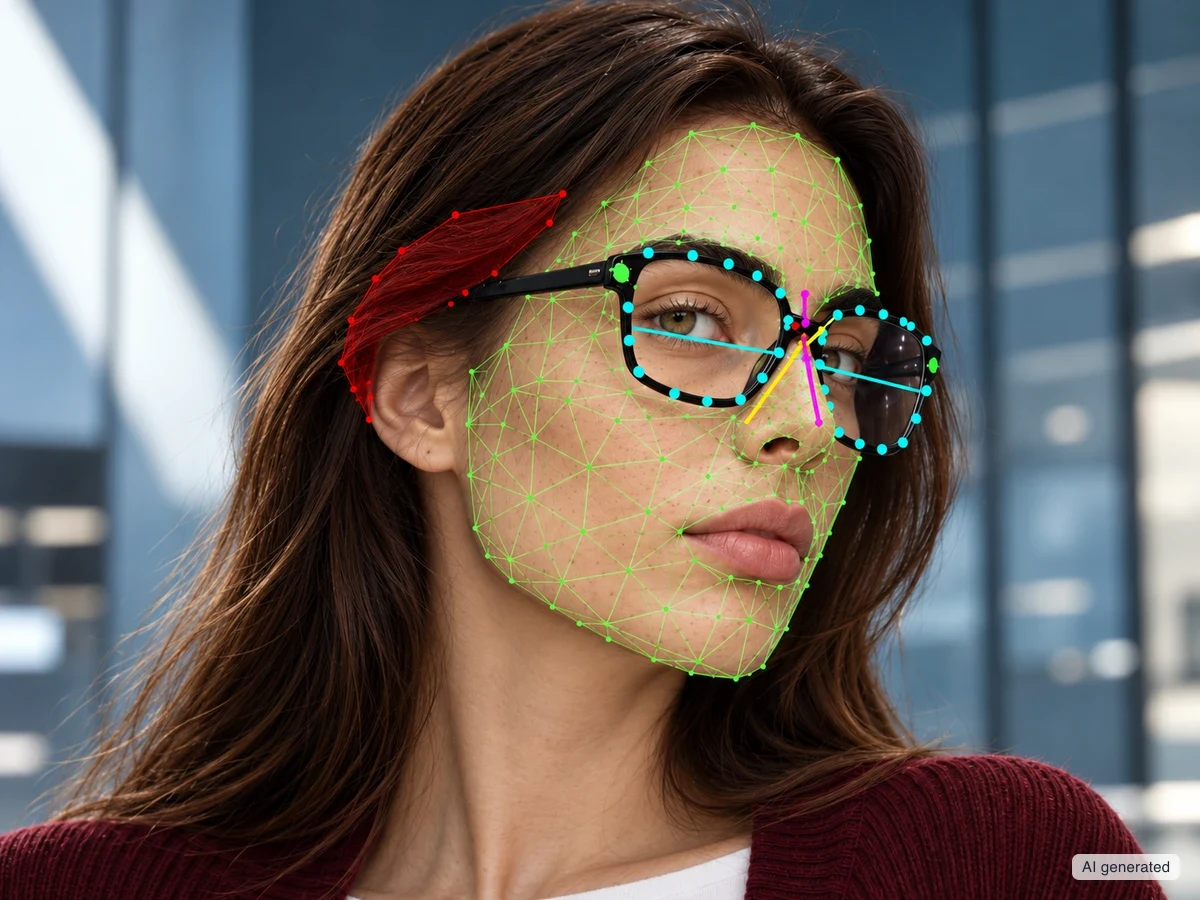
A real-time experience combines the camera feed with a digital representation of the frame. The system detects facial landmarks, tracks the pose and positions the glasses. Rendering reproduces materials, lenses, shadows and reflections.
Quality depends on the whole chain. A well-built model still has to be positioned consistently, and stable tracking still depends on an asset that matches the product. A complete demonstration lets you check both, including when the face turns.
Consistency across different views is also a problem that VTO research addresses. So in a demo, look at the frame from the front and from the side. Check that it keeps its position and proportions as the head moves.3
Fit: start from the product’s dimensions
The first check concerns the match between the physical glasses and the digital model. Shape, lens width, bridge and temples must refer to the variant actually sold. If there are several sizes, ask how they are represented and selected.
A true-scale asset is a starting point. The next thing to clarify is how the system determines scale on the user’s face. Ask which calibration it uses and how the result is compared with a physical try-on.
Bring frames from your own catalogue to the demo, in different shapes and sizes. Look at how the frame appears to sit on the nose, the width of the front and the behaviour of the temples. Also check that the frame does not pass through the face or float as the head turns.
These checks help you assess the visible proportions. Weight, pressure on the sides of the head, comfort and adjustment need a physical try-on. An accurate description from the provider makes clear what VTO contributes to the choice and leaves the assessment of the glasses as worn to the optician.
Realistic lenses: check what the customer sees
Lenses shape the look of a pair of glasses as much as the frame does. Transparency, tint, gradient and reflections can change how the face is perceived. During a demo, compare the digital variant with the corresponding product.
Ask how materials are prepared and how the rendering is checked. See whether the eyes stay visible through a clear lens. Check where a gradient falls and how a mirrored lens responds to the simulated light. The user’s camera, screen and lighting will still affect the result.
The visual rendering of lenses should be kept distinct from simulating a prescription. Reproducing the effects of a prescription lens requires specific information and a model of refraction. Research shows how these effects can change the appearance of the eyes in the virtual result. Ask the provider which characteristics it actually simulates.4
The same check applies to a photochromic demonstration: establish what is being shown and what data it is based on. How the lens looks on screen must accurately represent the function being demonstrated.
In the browser: test the whole flow
Browser access makes it possible to open the try-on from the retailer’s website. To evaluate it, use the same integration method planned for the project: product page, pop-up or catalogue.
Check how long it takes to reach the first try-on, how clear the instructions are and how the customer gets back to the product page. Also test what happens when camera access is refused or a session is interrupted. The customer must understand how to carry on.
The camera requires a secure (HTTPS) context and the user’s permission. When the try-on is embedded in another page, that page must also explicitly allow it to use the camera. Ask for a list of supported browsers and devices, then test a representative sample of your traffic.5
Measurement in the browser: understand what figure you get
Pupillary distance (PD) is the distance between the pupils. A tool may return a single total value or separate values for right and left. Ask which data it produces and whether they refer to distance or near PD.
The estimation procedure should be evaluated separately from the frame try-on. Check whether it requires a reference of known size, a particular device or precise conditions of pose and lighting. Find out how it signals an unreliable result.
A figure expressed in millimetres needs validation to document its accuracy. Studies of PD apps show differences between tools and methods. A 2024 study of 40 participants found differences in distance PD measurements compared with other instruments. The results apply to that specific app and that sample.6
Accuracy: ask how the measurement was validated
To assess an accuracy claim, ask for the reference instrument, the number of people involved and the devices used. You also need the capture conditions and the distribution of errors. An average value on its own can hide very different results.
Then distinguish between repeatability and accuracy. The first describes how similar successive captures are. The second concerns how close the result is to the reference value. A tool can produce repeatable results and still carry a systematic bias.
A quality indicator also needs interpreting. It may summarise the stability of the detected landmarks or the consistency of the samples. Ask how it relates to the measurement error and what testing supports that relationship. For operational use of the PD, agree with your optical team when the figure needs confirming.
Privacy: trace images, derived data and results
The camera access request is one step in the flow. A privacy assessment must trace the data through every feature: live try-on, PD estimate, photos, statistics and sharing.
Ask where camera frames are processed and what data leaves the device. Check images, facial landmarks, estimation results and technical session data separately. For each, establish the purpose, retention, recipients and responsibilities.
Face detection used to position a pair of glasses has a different purpose from identifying the person. European guidelines distinguish images from their processing for biometric identification. The assessment depends on the actual processing and its purpose.7
In ARShades Web VTO, the browser version of Virtual Try-On, the visual processing for the live try-on happens on the device. Camera frames are not sent to servers to run the try-on. The AR PD Meter follows a separate route: detection is local, while the calculation uses a cloud service and data derived from the face. The camera frames stay on the device.
This distinction lets you assess each feature on the basis of its own architecture. The privacy notice, the actual data flow and the project configuration must describe the same processing.
Retailer results: tell usage apart from sales
Published results can help you define a pilot project. They should, however, be read together with the metric, the period and the comparison used.
For the first quarter of 2024, KITS reported over one million VTO sessions, up 96% on the previous year. The sessions covered more than 1.35 million frames tried on. These figures are useful for documenting use of the service. On their own, they do not isolate the contribution of virtual try-on to sales.8
The same principle applies to the case studies a provider presents. Ask how the comparison was built and what other changes took place during the period. A result becomes more useful when you can see which conditions it refers to.
Measuring value in your own sales process
Before the try-on goes live, choose your main objective. It might be a purchase, an in-store booking or a qualified enquiry. Try-on launches and frames viewed help you interpret the path to purchase.
Where possible, compare groups randomly assigned to the experience with and without VTO. People who choose to try it of their own accord may already be more interested in buying. That group’s higher conversion therefore calls for careful interpretation.
For returns, look at the reasons linked to style, colour and size. If the path ends in the shop, include bookings and their outcome. Agree with the provider which events it can supply and which results must be measured in your own systems.
Catalogue and integration: check the day-to-day work
The demo should extend to the products the customer will have to choose from. Ask how many models and variants will be available, how the assets are checked and how a collection is updated.
Check the match with the product pages: the size, colour and lens tried on must be recognisable in the path to purchase. Establish whether the selected variant is passed back to the page and what integration that requires.
The provider should also explain who approves the digital models, how errors are reported and how updates are managed. Settling these points helps keep the experience consistent across the catalogue.
The checklist to take to the demo
Use your own catalogue and your customers’ devices as the benchmark. For each criterion, ask for observable evidence or precise documentation.
| Criterion | Question for the provider | What to check |
|---|---|---|
| Sizing | How do you determine scale on the face? | Correct variants and sizes; comparison with the physical product. |
| Fit | How does the frame behave as the head turns? | Position, temples and consistency across views. |
| Lenses | Which characteristics do you simulate? | Transparency, tint, gradients and reflections of the variant. |
| Browser | Which devices do you support? | Launch, permissions, instructions and error handling. |
| PD estimate | How did you validate the result? | Reference, sample, devices, repeatability and errors. |
| Privacy | What data leaves the device? | Separate flows for video, derived data, photos and statistics. |
| Catalogue | How do you manage products and updates? | Coverage, asset approval and variant matching. |
| Results | How do we measure the VTO’s contribution? | Shared objective, available events and a controlled comparison. |
Evaluating ARShades Virtual Try-On
ARShades Virtual Try-On combines 3D models, face tracking and real-time rendering. The try-on helps assess style, proportions and materials across the brand’s digital channels.
To evaluate it for your project, start from representative frames, common devices and a precise commercial objective. Check the complete flow, from selecting the variant to returning to the product page.
Read more about ARShades Virtual Try-On and see the Plans to find the option that suits your catalogue.
Sources
-
Weber, S., Wyszynski, M., Kordyaka, B. and Niehaves, B. (2025). Bridging Immersive IS Design and Economic Value: Creating More Product Recommendations Through Inspiring and Interactive Virtual Try-Ons. Communications of the Association for Information Systems, 57, 1255–1275. ↩
-
Grand View Research. Eyewear Market Size, Share & Trends Analysis Report, 2026–2033. Data on distribution channels in 2025. ↩
-
Rak, A., Wirth, T., Lindemeier, T., Knauthe, V. and Kuijper, A. (2024). View-Consistent Virtual Try-on of Glasses using a Hybrid NeRF-Mesh Rendering Approach. EG UK Computer Graphics & Visual Computing. ↩
-
Zhang, Q., Guo, Y., Laffont, P.-Y., Martin, T. and Gross, M. (2017). A Virtual Try-on System for Prescription Eyeglasses. IEEE Computer Graphics and Applications. ↩
-
MDN Web Docs. MediaDevices: getUserMedia() method. Web API documentation; accessed 7 October 2026. ↩
-
Jung, Y. R. and Chu, B. S. (2024). A Comparative Analysis of Interpupillary Distance Measurement Techniques Evaluation in Modern Times: From Rulers to Apps. Clinical Optometry, 16, 309–316. ↩
-
European Data Protection Board (30 January 2020). Guidelines 3/2019 on processing of personal data through video devices. Final version. ↩
-
KITS Eyecare (16 May 2024). KITS Eyecare Records Over One Million Virtual Shopping Sessions for Eyecare in the First Quarter of 2024. ↩
Share
Send this article to a colleague or save the link.